Record replay files for all Students
Replay files can be created at any Student machine that the Tutor views.
Record replay files
-
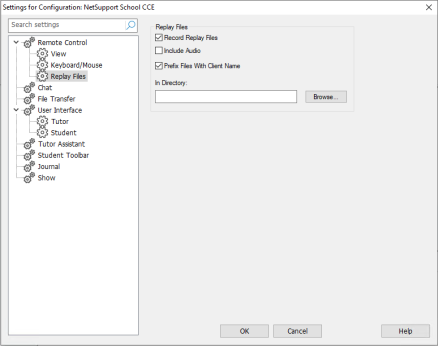
Click Options in the Tutor Console, select Settings from the drop-down menu and choose Replay Files.
-
Enable the Record Replay Files checkbox. A replay file will be created each time the Tutor opens a view session at any Student machine.
-
Prefix Files With Client Name
In order to identify each replay file, file names are prefixed with the Student name and the date/time of the recording. Alternatively, by unchecking this box, the files will be named sequentially in the format 00000001.rpf etc.
-
In Directory
Specify where the replay files are to be stored.
-
Click OK.
See also:
Record replay files for individual Students
Showing replay files to Students
Record replay files at the Tutor machine


