Record replay files for individual Students
Replay files can be created at selected Student machines.
Record replay files
-
View the required Student machine.
-
Click the Settings
 icon in the caption bar and select Replay Files.
-
-
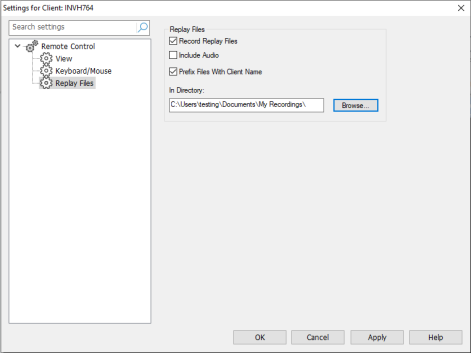
Enable the Record Replay Files checkbox. A replay file will be created each time the Tutor opens a view session at any Student machine.
-
Prefix Files With Client Name
In order to identify each replay file, file names are prefixed with the Student name and the date/time of the recording. Alternatively, by unchecking this box, the files will be named sequentially in the format 00000001.rpf etc.
-
In Directory
Specify where the replay files are to be stored. A separate folder can be specified for each Student.
-
Click OK. Recording will start immediately, close the View session to stop recording.
-
Repeat steps 1-7 for any other Student machines.
See also:
Record replay files for all Students
Record replay files at the Tutor machine
Showing replay files to Students


