NetSupport Connectivity Server Configuration Utility - Servers tab
By default, the NetSupport Connectivity Server operates as a standalone Primary Connectivity Server. You can configure this NetSupport Connectivity Server to operate as a standalone Secondary Connectivity Server, which acts as a backup if the Primary Connectivity Server becomes unavailable.
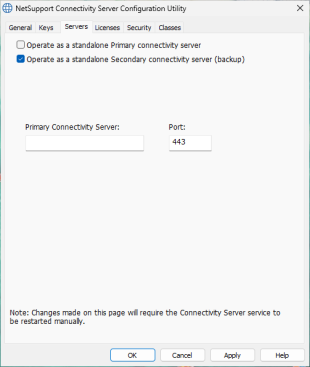
NetSupport Connectivity Server Configuration Utility dialog
Operate as a standalone Primary connectivity server
Select this option to configure this NetSupport Connectivity Server to operate as a standalone Primary Connectivity Server. This option is selected by default.
Operate as a standalone Secondary connectivity server (backup)
Select this option to configure this NetSupport Connectivity Server to operate as a standalone Secondary Connectivity Server.
Enter the fully qualified domain name (FQDN) and port number of the Primary Connectivity Server. The default port is 443.
See also:
NetSupport Connectivity Server Configuration Utility - General tab
NetSupport Connectivity Server Configuration Utility - Keys tab
NetSupport Connectivity Server Configuration Utility - Licences tab
NetSupport Connectivity Server Configuration Utility - Security tab
NetSupport Connectivity Server Configuration Utility - Classes tab