Student stickers
NetSupport School CCE allows you to send animated stickers to Students recognising students' good behaviour. During a lesson, you can send a sticker to individual Students, which is reflected on the Student Toolbar.
-
The Student Toolbar must be switched on to use this feature.
-
This feature is only available for Windows Students running v15.00 or higher.
Sending a sticker
-
Select the Student(s) in the List view.
-
Select the Feedback & Wellbeing tab on the ribbon.
-
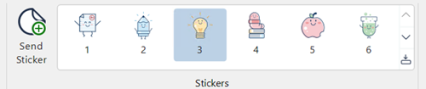
A selection of stickers is displayed.
-
Select the required sticker from the gallery. To view all available stickers, click the Show drop-down
 icon.
icon. -
Click Send Sticker.
-
A large version of the sticker appears on the Student screen before animating to the Student Toolbar.
See also: